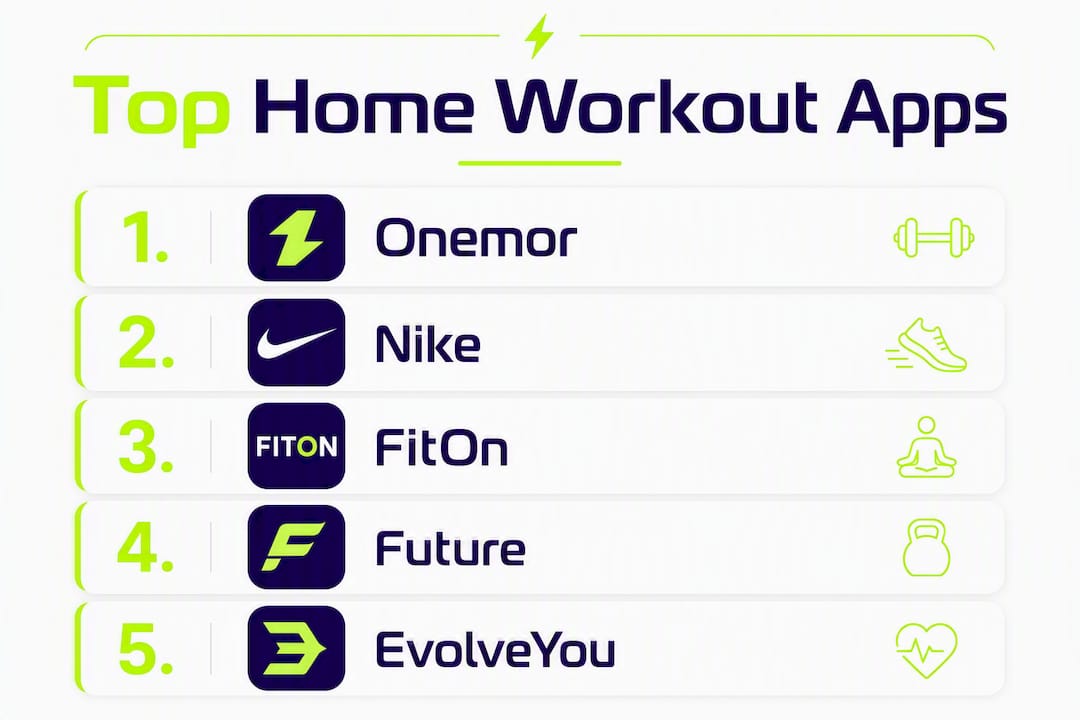
The single best home workout app for Gen-Z and young adults seeking structured, social training is Onemor — it gives you real coach-led programs, sets/reps/rest timers, and tribe challenges that keep you coming back. If you want live classes, Peloton App is the go-to. For free content, Nike Training Club and FitOn App are hard to beat. For one-on-one coaching, Future stands alone.
Here’s the quick shortlist by goal:
Best for Gen-Z / social, structured training — Onemor
Best for live classes — Peloton App
Best free option — Nike Training Club or FitOn App
Best for small spaces / no equipment — EvolveYou
Best for guided coaching — Future
Best for yoga and mindful movement — Alo Wellness Club or MWH (Melissa Wood Health)
Best for strength programming — Stronger By The Day
Best for endurance tracking — Strava
Most of these apps offer a free tier or a free trial. Use that window seriously — not just to browse, but to complete at least one full workout and check whether the app shows you a clear next session.
The apps that actually change your body are the ones you open three times a week, not the ones with the biggest content library. Structure and consistency beat variety every time.
Pro Tip:Before you commit to any subscription, complete one full session on the free tier. If the app doesn’t show you what to do next after that session ends, the program structure probably isn’t strong enough to keep you progressing.
What are the best home workout apps right now?
Each app below is presented with the details that actually matter for your decision. Onemor leads because it’s built specifically for the audience this article is written for — but every entry here earns its spot.
Onemor
Best for — Gen-Z and young adults (16–30) who want short, coach-led home workouts with social accountability
Equipment required — Bodyweight options available; some programs use dumbbells
Device compatibility — iOS
Personalization/coaching features — Guided sessions with sets, reps, and rest timers; multiple real coaches with distinct programs across strength, HIIT, and bodyweight
Motivation/community features — XP system, streaks, tribe-based challenges with friends
Pros — Structured progression, social features built into the core experience, beginner-friendly entry points, no planning required
Cons — iOS only; smaller content library than Peloton or Nike Training Club
Onemor’s edge is that it was designed for people who want results without spending an hour planning their own routine. The tribe challenges and XP system aren’t cosmetic — social features like these genuinely improve adherence for younger adults when they’re woven into the app experience, not bolted on as an afterthought.
Peloton App
Best for — Users who want live classes and a large instructor-led library
Price & free trial — Free trial available; monthly subscription required for full access
Cons — Personalization is limited on the free tier; premium adds meal plans and offline access
Free tiers vary more than most people expect. Some apps give you full programs for free; others give you a single workout and call it a library. Always check whether the free plan includes a complete program with progression, or just a sample.
How do you choose the right home workout app for your goals?
The right app depends on five things: your schedule, your equipment, how much coaching you want, your budget, and what keeps you motivated. Here’s a practical checklist to work through before you commit.
Time commitment — If you have 25–40 minutes, three times a week, that’s enough for real progress when the programming is solid. Look for apps with sessions in that range, not apps that default to 60-minute classes.
Equipment — Be honest about what you have at home. A bodyweight-only app like EvolveYou or FitOn works in any space. If you have dumbbells, Onemor, Sweat, and Stronger By The Day all make good use of them.
Coaching and personalization — Do you want a real human coach (Future), a structured program from a named trainer (Onemor, Sweat, Centr), or a self-directed library (Nike Training Club, FitOn)? These are genuinely different experiences.
Budget — Nike Training Club and FitOn App offer the strongest free tiers. Most other apps run $10–$30/month for full access, with annual plans offering meaningful discounts.
Device compatibility — Onemor and Future are iOS-only. Most others support both iOS and Android. If you want TV casting or wearable integration, check each app’s specific support before subscribing.
Offline use — If you train somewhere without reliable Wi-Fi, offline access matters. Premium tiers on FitOn, Peloton App, and Apple Fitness+ typically include offline downloads; free tiers often don’t.
Community and accountability — Streaks, tribe challenges, and leaderboards aren’t just fun extras. For younger adults especially, social features built into the app experience measurably improve how often people actually show up.
For beginners, the most important factor is clarity: does the app tell you exactly what to do next? For strength-focused users, look for progressive overload built into the program. For small-space training, prioritize apps with bodyweight-first options.
Pro Tip:During your free trial, don’t just browse the content library. Complete one full session, then check what the app suggests you do next. If there’s no clear “next session” prompt or program continuation, the app probably won’t keep you progressing past week two.
Expert-reviewed profiles of every app on this list
Onemor
Onemor is built for the reader this article is written for: a young adult who wants to train at home, doesn’t want to plan their own workouts, and needs something that feels worth coming back to. The app delivers guided sessions with sets, reps, and rest timers so you’re never guessing what to do. Coaches like Branden and Kayla lead distinct programs across strength, HIIT, and bodyweight, so you can pick a style that fits your goal.
Pros — Structured progression, real coach-led programs, tribe challenges and XP that make consistency feel rewarding, beginner-friendly entry points
Cons — iOS only; library is smaller than Peloton or Nike Training Club
Pricing snapshot — Free tier available; premium subscription on iOS
Peloton App
Peloton’s app stands apart for its live-class ecosystem. The energy of a live class with a leaderboard is a real motivator for people who miss the gym atmosphere. Without Peloton hardware, you’re limited to strength, yoga, and bodyweight classes, which are still high quality but don’t fully use the platform’s strengths.
Pros — Huge library, live classes, high production value
Cons — Best experience requires Peloton hardware; higher subscription cost
Pricing snapshot — Monthly subscription; free trial available
Apple Fitness+
If you’re already in the Apple ecosystem and own an Apple Watch, Fitness+ is a genuinely elegant experience. Real-time metrics from your watch appear on screen during workouts, which adds a layer of feedback most apps can’t match. Outside the Apple ecosystem, it’s not an option.
Pros — Best-in-class Apple Watch integration, clean interface
Cons — Requires Apple Watch for full value; no Android support
Pricing snapshot — Standalone subscription or included with Apple One; free trial available
Nike Training Club
Nike Training Club’s free tier is one of the most functional in the home fitness category. You get real programs, not just sample workouts. The trainer and athlete content adds credibility, and the bodyweight options make it genuinely usable in any space.
Cons — Less structured progression than program-first apps
Pricing snapshot — Free tier available; premium plan for additional content
Sweat
Sweat’s strength is its multi-week program structure. Each program has phases that build on each other, which is exactly what you want if your goal is a body-composition change over 8–12 weeks. The community forum adds some accountability, though it’s less integrated than Onemor’s tribe model.
Pros — Clear program phases, named coaches, strong progression
Pricing snapshot — Free trial; monthly or annual subscription
Alo Wellness Club
Alo Wellness Club is the right pick if yoga and mindful movement are your primary goals. The production quality is genuinely premium. For anyone looking for strength or HIIT as their main focus, it’s not the right fit.
Pros — Premium yoga and wellness content, beautiful production
Cons — Limited strength or high-intensity content
Pricing snapshot — Subscription-based; free trial available
Centr
Centr bundles fitness, nutrition, and mindfulness into one subscription, which is appealing if you want to address all three without managing multiple apps. The workout content is solid across several formats, though it’s not as deep as a single-focus app.
Pros — All-in-one wellness coverage, credible expert team
Cons — Workout depth is secondary to the wellness bundle
Future is the most personalized option on this list, full stop. You’re matched with a real human coach who builds your plan, checks in weekly, and adjusts based on your progress. The price reflects that level of service.
Pros — Real human coach, highest personalization, Apple Watch integration
Cons — Most expensive option; iOS only
Pricing snapshot — Higher price point; free trial available
Ladder App
Ladder is built for athletes who take recovery as seriously as training. The data-driven programming and recovery tools make it a strong pick for intermediate-to-advanced users. Beginners may find it overwhelming.
Pros — Performance programming, recovery emphasis
Cons — Less beginner-friendly; assumes gym equipment access
Pricing snapshot — Subscription-based; trial available
Shred
Shred’s short, intense formats are its defining feature. If you have 20 minutes and want to work hard, it delivers. The programming depth is lighter than apps like Sweat or Onemor, but for quick sessions it’s a practical choice.
Pros — Short formats, minimal equipment, good for busy schedules
Strava isn’t a home workout app in the traditional sense, but for runners and cyclists it’s the best social tracking tool available. The leaderboard and club features create genuine community around outdoor training.
Pros — Best activity tracking for endurance sports, strong social features
Cons — No strength or home workout content
Pricing snapshot — Free tier; premium for advanced analytics
EvolveYou
EvolveYou is the clearest recommendation for anyone training in a small space with little or no equipment. The programs are genuinely progressive, and the bodyweight-first design means you don’t need to buy anything to get started.
For users whose primary goal is getting stronger, Stronger By The Day’s program templates are clear and well-structured. It assumes you have access to some weights, so it’s less suited to fully equipment-free training.
Pros — Clear strength programming, good for intermediate lifters
Cons — Limited cardio or recovery content
Pricing snapshot — Subscription-based
MWH (Melissa Wood Health)
MWH is a strong choice for recovery days, low-impact goals, or anyone returning to movement after a break. The Pilates-inspired, mat-based approach is calming and accessible without being ineffective.
Pros — Low-impact, mindful, great for recovery or gentle movement goals
Cons — Not suited for high-intensity or heavy strength goals
StrongHer’s women-centered programming and community make it a meaningful choice for women who want strength training built around their specific needs. The narrower focus is a feature, not a limitation, for its target audience.
Pros — Female-focused programming, supportive community
Cons — Narrower audience by design
Pricing snapshot — Subscription-based; trial available
Wilma App
Wilma has a boutique, personal feel that larger platforms don’t replicate. If you want to feel like you’re training with a specific instructor rather than browsing a catalog, it’s worth a look.
DPFit offers a varied trainer-led class library for users who want diversity in their sessions. Detailed public information on program depth is limited, so the free trial is especially worth using here.
Pros — Variety of class types, trainer-led
Cons — Less public information on program structure
Pricing snapshot — Subscription-based
FitOn App
FitOn’s free tier is the most generous on this list for class variety. Celebrity trainer content and a broad format range make it a strong starting point for anyone not ready to pay. The premium tier adds offline access and meal plans.
Pros — Large free library, celebrity trainers, broad format variety
Cons — Limited personalization on the free tier
Pricing snapshot — Free tier available; premium subscription for offline and meal planning
Pro Tip:If you’re deciding between two apps, check whether each one shows you a specific next session after you finish a workout. Apps that do this keep you progressing. Apps that drop you back into a browse screen put the planning burden back on you.
How we picked and tested these apps
We evaluated home workout apps across seven criteria: programming quality, progression clarity, beginner accessibility, UI/UX, coaching and personalization features, motivation and community features, and reliability including offline capability.
Testing involved completing at least one full program week on each app, checking whether the free tier included real progression or just sample content, and verifying device compatibility and offline access. We also assessed whether each app showed clear sets, reps, and rest timers, since structured programming and clear progression are the most reliable predictors of whether a user can actually follow and advance with an app.
Apps were excluded if they focused primarily on outdoor or gym-only training without a meaningful home workout component. Strava is included as an exception because of its relevance to the endurance-focused segment of the audience.
Trainer-reviewed criteria were weighted toward programming quality and progression over content volume. A library of 500 workouts with no program structure scores lower than a focused library of 50 workouts with clear week-by-week progression.
What does the research say about home workout results?
The 3-3-3 workout rule has become one of the most-discussed beginner frameworks in fitness. It has two common interpretations: three strength sessions, three cardio sessions, and three active recovery days per week; or three workouts per week, three exercises per session, three sets per exercise. Both versions share the same core principle: simplicity and repeatability beat complexity.
Personal trainer Aimee Victoria Long, cited in Women’s Health, emphasizes that clarity and manageable routines are what support long-term consistency, particularly for people balancing busy lives. The research backs this up: weekly training volume predicts gains better than frequency alone, which means a well-programmed three-day week can deliver real results when the sessions are focused.
What does that mean for app selection? Look for apps that build progressive overload into the program, not just apps that add more sessions over time. The quality of each session matters more than how many you do.
A practical example week for a beginner using a structured app:
Friday — 30-minute strength session or active recovery (mobility, low-impact movement)
That’s it. Focused sessions of moderate length are enough for meaningful progress when the programming is solid and you show up consistently.
One detail most people skip: warm-ups. Dynamic warm-ups improve power output and reduce muscle stiffness before compact, high-effort sessions, which matters especially when your workout is only three sets of three exercises. Apps that include a short dynamic warm-up before each session reduce your injury risk and make those working sets more effective.
Pro Tip:When evaluating an app’s program, check whether it includes a warm-up before each session. A 5-minute dynamic warm-up before a short, intense workout isn’t optional — it’s what makes those few working sets actually safe and effective.
Key Takeaways
The best home workout apps are the ones you’ll actually use consistently, with clear programming that tells you exactly what to do next.
Structure beats library size. Apps with clear program progression outperform large content libraries for adherence and results.
25–40 minutes is enough. Focused sessions in this range, done consistently three times a week, deliver real progress.
Free tiers vary widely. Check whether the free plan includes a full program with progression, not just sample workouts.
Warm-ups matter in short sessions. Dynamic warm-ups before compact, high-effort sessions reduce injury risk and improve performance.
Onemor for Gen-Z / young adults. Onemor’s tribe challenges, XP, and coach-led programs make it the strongest fit for structured, social home training.
Why Onemor is the recommended pick for this audience
Full disclosure: Onemor is the publisher of this article, and it’s one of the apps on this list. That’s worth saying plainly.
The recommendation isn’t circular. Onemor was built specifically for Gen-Z and young adults who want structured, short, social home workouts. The tribe challenges, XP system, and coach-led programs with sets/reps/rest timers address the exact reasons younger adults stop using fitness apps: lack of structure, no accountability, and no reason to come back tomorrow. For that specific audience, it’s the strongest fit on this list.
That said, other categories genuinely serve different needs better. If you want a large live-class ecosystem with high-production instructor energy, Peloton App is the right choice. If you want a dedicated human coach who builds your plan and checks in weekly, Future is in a different category entirely. If your primary training is running or cycling outdoors, Strava is purpose-built for that in a way no home workout app can replicate.
App features and pricing change. We’d recommend reassessing your app choice after every trial period and at least once a year, especially as your goals evolve. What works for a beginner in month one often isn’t the right tool for an intermediate lifter in month six.
Onemor gives you structure, community, and a reason to keep going
You’ve just read through 18 apps. Here’s the short version for the reader this article is written for: if you’re a young adult who wants to train at home, doesn’t want to plan your own workouts, and needs something that actually keeps you coming back, Onemor is the place to start.
Real coach-led programs from trainers like Wilbert and Jahson give you guided sessions with sets, reps, and rest timers so you’re never guessing. Tribe challenges and XP make consistency feel rewarding rather than obligatory. Beginner-friendly programs mean you don’t need a fitness background to get started. And the free tier lets you try it before you commit.
Available on iOS. Start with a free session and see whether the structure fits how you want to train.
Sources and further reading
The claims and methodology in this article draw on the following sources. Each is worth reading if you want more depth on the frameworks behind the recommendations.
The 3-3-3 workout rule is trending — here's what you need to know — Tom's Guide coverage of both interpretations of the 3-3-3 rule and why weekly volume matters more than session frequency
Why PTs swear by the 3-3-3 workout rule for better results and recovery — Women's Health trainer commentary from Aimee Victoria Long on clarity, manageable routines, and active recovery; also the source for the 25–40 minute session guidance
The 3-3-3 workout rule: What science says about its effectiveness — Times of India review of the dynamic warm-up evidence and its relevance to compact, high-effort sessions
Free Workouts To Achieve Any Goal — Onemor's main platform page, used to verify free tier availability and program positioning
Best Workout Apps for Women: Top Picks for 2026 — Onemor's own roundup, which informed the free-tier comparison and personalization checklist
The best next step is a free trial, not more research. Pick the app that matches your goal from this list, complete one full session, and check whether it tells you what to do next. That single test tells you more than any review.