You can track workouts without a watch, and it works better than most people expect. Your phone already counts steps and distance. A few minutes of manual logging covers the rest. If you train 2-3 times a week, the thing that matters most is a record of what you did, so you can beat it next time. In Onemor, sets, reps and rest timers are built into guided sessions, so logging is part of the workout instead of a chore after it.
Here is how to set it up, what to expect, and what to track so your effort turns into progress.
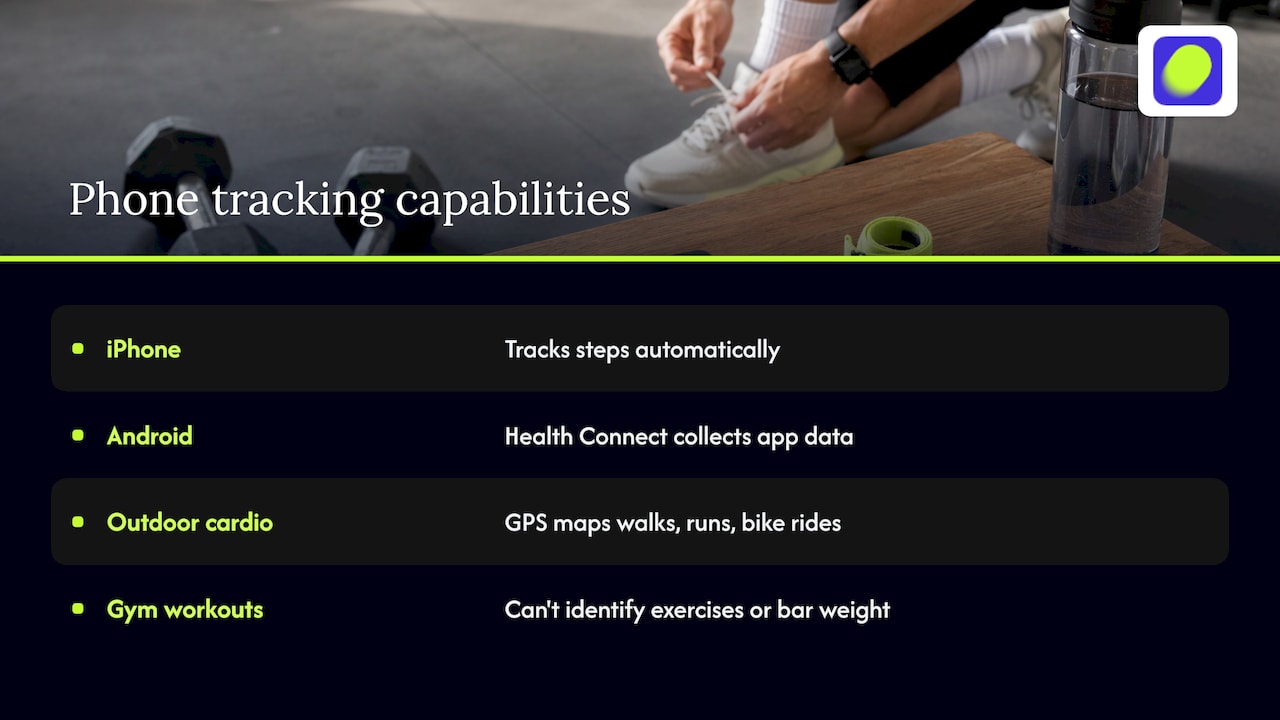
Your phone is more capable than you might think. According to WIRED, an iPhone tracks steps automatically through its built-in motion sensors, with nothing to switch on. On Android, Health Connect can’t track by itself, but it collects data from apps that count steps using the phone.
That covers walking, running and general daily movement. Outdoor cardio is easy: keep your phone in a pocket, armband or waistband and let it record. Apps that use GPS can map walks, runs and bike rides from the phone alone.
What the phone does not see is what happens inside the gym. It can’t tell a set of goblet squats from a set of lunges, and it can’t know how much weight is on the bar. That part is quick to log by hand, and we cover it below.
For most beginners, yes. A JAMA research letter tested 14 adults across 56 treadmill trials. Smartphone apps landed within about -6.7% to +6.2% of the true step count. The wearable devices in that test undercounted by -22.7% to -1.5%.
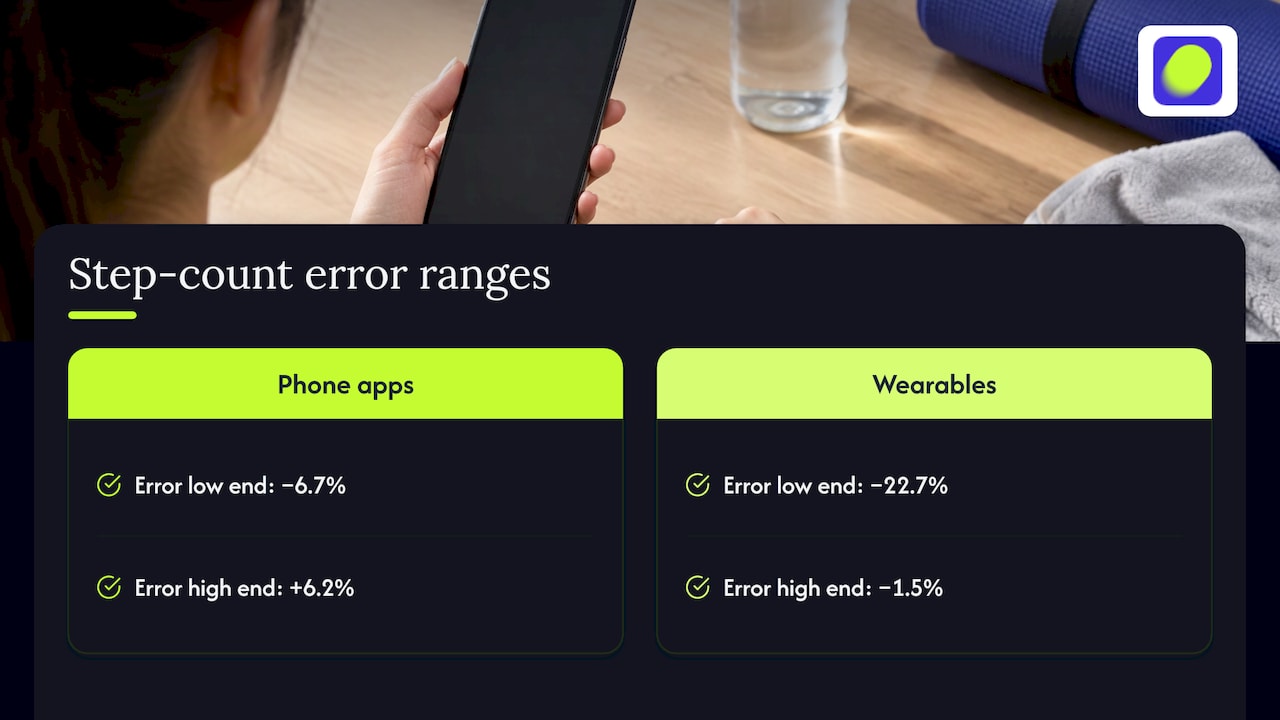
The same authors note that small step differences can add up in estimates like distance and calories. So treat calorie numbers as rough guides, not exact scores.
A 2015 editorial in PMC adds a practical tip: results are most consistent when the phone is carried in the same place every day. Pick a spot, like your front pocket, and stick with it.
The goal isn’t a perfect number. It’s a number you can compare against last week.
If you have an iPhone, the built-in Fitness app is the fastest way to start. PCMag walks through the setup, which needs iOS 16 or higher:
Without a watch, the app shows your Move calories, exercise time, stand time, step count, step distance and sessions. You can browse previous days too, which is handy for spotting your pattern across a week.
Start with a small Move goal you can hit on a lighter day. A goal you meet regularly builds the habit faster than one you miss.
Forgot to carry your phone, or trained somewhere you couldn’t? You can still give yourself credit. iMore explains the manual route in the Health app:
A manual workout counts toward your Move, Exercise and Stand rings. Add it right after you finish, while you still remember how long you trained and how hard it felt.
Wondering about heart rate? Camera-based apps can take a reading through your fingertip. WIRED mentions iOS and Android apps that do this, though they aren’t as comprehensive as a tracker monitoring in real time. Some sleep apps also work with the phone placed on the mattress.
For a beginner training 2-3 times a week, you rarely need live heart rate. A simple effort scale does the job:
If you have a heart condition, feel dizzy or get chest pain during exercise, stop and talk with your doctor before continuing.
This is where most people’s progress actually lives. Whether you train at a Florida gym or in your living room, five fields cover almost everything:
That’s enough to see progress. Next session, try one more rep or a little more weight. Our guide to workout logging for busy lifters shows how to start with five fields and add more detail later.
Phones track movement, but they don’t plan your training. If you’re wondering whether you need a tracker or a full plan, our breakdown of a workout plan app versus a workout tracker helps you decide. Many beginners find that a plan which does the logging for them is the easiest route.
A tracking habit survives when it’s small. Try this routine:
What if you miss a day? Nothing breaks. Log the next session and carry on. Steady beats perfect.
Tracking is easier when someone else has already planned the workout. Onemor is a fitness app for Gen Z on iOS, with free and premium options. You train with workouts led by expert coaches, and each guided session includes sets, reps and rest timers. So you always know what to do next and what to record.
We built Onemor so you can get structure without spending hours planning your own routine. Our workouts are designed to run under an hour, covering strength, HIIT and bodyweight for the gym or home. Streaks and XP reward showing up, and tribe-based challenges let you train alongside friends.
Ready to see how it feels? Start with the free plan, or compare it with Pro when you want more coaching. If you’re curious how coach-led training stacks up against going it alone, our post on free workout apps and coach-led alternatives is a good next read.
Yes. The iPhone’s Fitness and Health apps record steps and distance from the phone’s sensors, and you can add workouts by hand. Onemor also has a free plan, so you can start with guided sessions without a wearable.
Yes. In the Health app, tap Browse, search Workouts, then Add Data. Enter the activity type, calories, distance and times. iMore explains the steps, and the workout counts toward your rings.
Camera-based apps can estimate it from your fingertip, per WIRED. For everyday training, an effort scale like easy, moderate and hard works well. If something feels wrong, stop and see your doctor.
Start with exercise, weight, reps, sets and rest. Those five fields show whether you’re getting stronger. Add other details later, once logging feels automatic.